
You are not logged in.


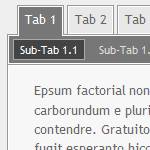 Simple tab menu
[tabmenu][tab='Tab 1']Content 1[tab='Tab 2']Content 2[/tabmenu] or
[tabmenu][tab='Tab 1',icon URL]Content 1[tab='Tab 2',icon URL 2]Content 2[/tabmenu] or
[tabmenu][tab='Tab 1'][subtab='Tab 1.1']Content 1.1[subtab='Tab 1.2']Content 1.2[tab='Tab 2']Content 2[/tabmenu] or
[tabmenu][tab='Tab 1',icon URL 1][subtab='Tab 1.1',icon URL 1.1]Content 1.1[subtab='Tab 1.2']Content 1.2[tab='Tab 2']Content 2[/tabmenu]
This bbcode can be used to integrate dynamic tab menus into your text. You can create any number of parent menu items (?tabs?) and each parent item can contain any number of child elements (?sub-tabs?). You can specify a title and an icon for each tab and sub-tab; please not that the size of the icons should not exceed 24 × 24 pixels (for tabs) and 16 × 16 pixels (for sub-tabs) respectively. You can assign a formatted text for each menu item which will be displayed when the user selects the correspondent tab or sub-tab. As usual, you can use any bbcodes to create the content of each menu item, the only exception being the tab-menu-bbcode itself; a single tab or sub-tab can never contain another complete tab menu.
Displaying the tab menus as actual menus requires a browser that allows the use of JavaScript. If the use of JavaScript is disabled, the content of the tab menu will be displayed as blocks of text while the original structure remains intact by using hierarchic lists and headlines.
The syntax of the tab-menu-bbcode is similar to the one of the list-bbcode and the functions of the bbcode-system as a whole.
The tab-menu-bbcode itself does not come with any additional parameters, instead of that, every new menu item is introduced by [tab]. Like with the list-bbcode, no closing tag ([/tab]) is used. Using the first parameter of this pseudo-tab-bbcode you can set the title of the menu item and using the second (and optional) parameter you can assign an icon that is to be displayed in front of the new menu item. The size of the linked icon should not exceed 24 × 24 pixels. The [tab]-tag is followed by the content of the menu item, until the next use of the [tab]-tag creates a new menu item or the tab menu is completed by using [/tabmenu]:
[tabmenu]
	[tab='title of the first tab',URL of the icon if the first tab]
		Content of the first tab
	[tab='title of the second tab',URL of the icon of the second tab]
		Content of the second tab
[/tabmenu]
Specifying an icon is always optional, but if you decide to use icons, you should make sure to add icons to every single menu item, not just to specific ones.
Adding sub-tabs to existing tabs works in the same way, the corresponding tag is [subtab]. The parameters are identical to those of the [tab]-tag, but icons should not exceed the size 16 × 16 pixels. The [subtab]-tag is followed by the content of the sub-tab, until [subtab] or [tab] introduce another sub-tab or tab or [/tabmenu] completes the tab menu:
[tabmenu]
	[tab='title of the first tab',URL of the icon of the first tab]
		[subtab='title of the first sub-tab',URL of the icon of the first sub-tab]
			Content of the first sub-tab
		[subtab='title of the second sub-tab',URL of the icon of the first sub-tab]
			Content of the secnd sub-tab
	[tab='title of the second tab',URL of the icon of the second tab]
		Content of the second tab
	[tab='title of the third tab',URL of the icon of the third tab]
		[subtab='title of the first sub-tab']
			Content of the first sub-tab of the third tab
		[subtab='title of the second sub-tab']
			Content of the second sub-tab of the third tab
[/tabmenu]
Each tab menu can contain any number of tabs and each menu item can contain any number of sub-tabs, but please not that a single menu can not contain more than one tab with identical titles and a single tab can not contain more than one sub-tab with identical titles.
[tabmenu]
	[tab='Tab 1',http://www.woltlab.com/forum/wcf/icon/helpM.png]
		[subtab='Sub-Tab 1.1',http://www.woltlab.com/forum/wcf/icon/helpS.png]
			Content of the first sub-tab of the first tab
		[subtab='Sub-Tab 1.2',http://www.woltlab.com/forum/wcf/icon/infoS.png]
			Content of the second sub-tab of the first tab
		[subtab='Sub-Tab 1.3',http://www.woltlab.com/forum/wcf/icon/warningS.png]
			Content of the third sub-tab of the first tab
	[tab='Tab 2',http://www.woltlab.com/forum/wcf/icon/infoM.png]
		[subtab='Sub-Tab 2.1']
			Content of the first sub-tab of the second tab
		[subtab='Sub-Tab 2.2']
			Content of the second sub-tab of the second tab
		[subtab='Sub-Tab 2.3']
			Content of the third sub-tab of the second tab
	[tab='Tab 3',http://www.woltlab.com/forum/wcf/icon/warningM.png]
		Content of the third tab
[/tabmenu]
 Tab 1
Tab 1 Sub-Tab 1.1
 Sub-Tab 1.2
 Sub-Tab 1.3
 Tab 2
Tab 2 Tab 3
Tab 3 Monday, December 15th 2025, 8:42pm
 Go to the top of the page


